
v7.3 v7.2 v7.1 v7.0 v6.12 v6.11 v6.10 v6.7 v6.6 v6.5 v6.4 v6.3 v6.2 v6.1 v6.0 v5.3 v5.2 v5.0 v4.8 v4.6 v4.5 v4.4 v4.3 v4.0 latest <= v3.4 Cloud Data Center

How to manage your Survey Templates

In order to find the overview of all Survey Templates you have access to, first navigate to your User settings
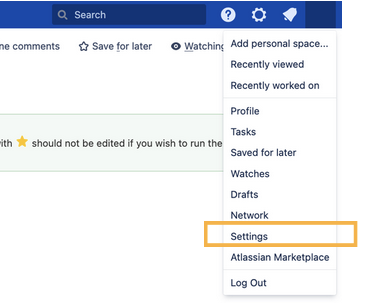
image-20251114-145951.png

and then navigate to the tab “Survey Templates”.
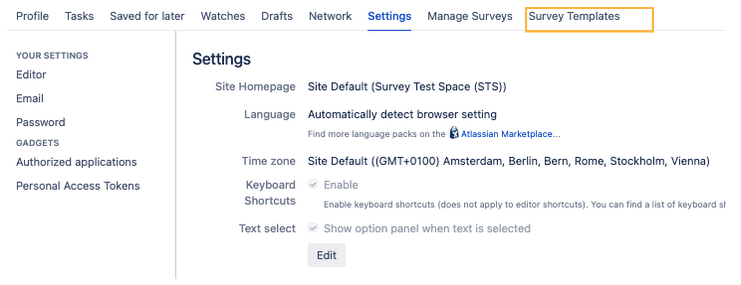
image-20251118-062330.png

In this tab you will see all Templates where you have been added as a Survey Manager either via your name, or as a group.
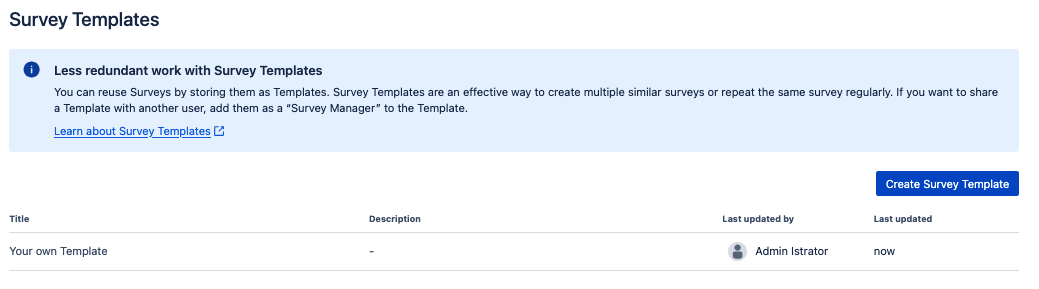
image-20251119-083930.png

Additionally, on this page you can also easily create new Templates, edit them and delete them.