
To use the app with OpenAI, you will need to set up your own OpenAI API key first. If this method is not suitable for you, the app also comes with a custom Rovo agent that allows you to generate presentations using Atlassian’s AI systems, though this requires an active Rovo subscription with Atlassian.
Select the sprint and issues to use
Before generating slides with OpenAI, you will first need to select issues for your presentation.
Generate Slides
Clicking the Generate Slides with OpenAI button will start the automatic slide generation process.
To adjust how the slides are generated and what data is sent, click on the gear button 
If any of your selected issues do not contain enough information to make it onto a slide, a warning will appear a few seconds into the process, indicating that these issues have been dropped from the presentation.
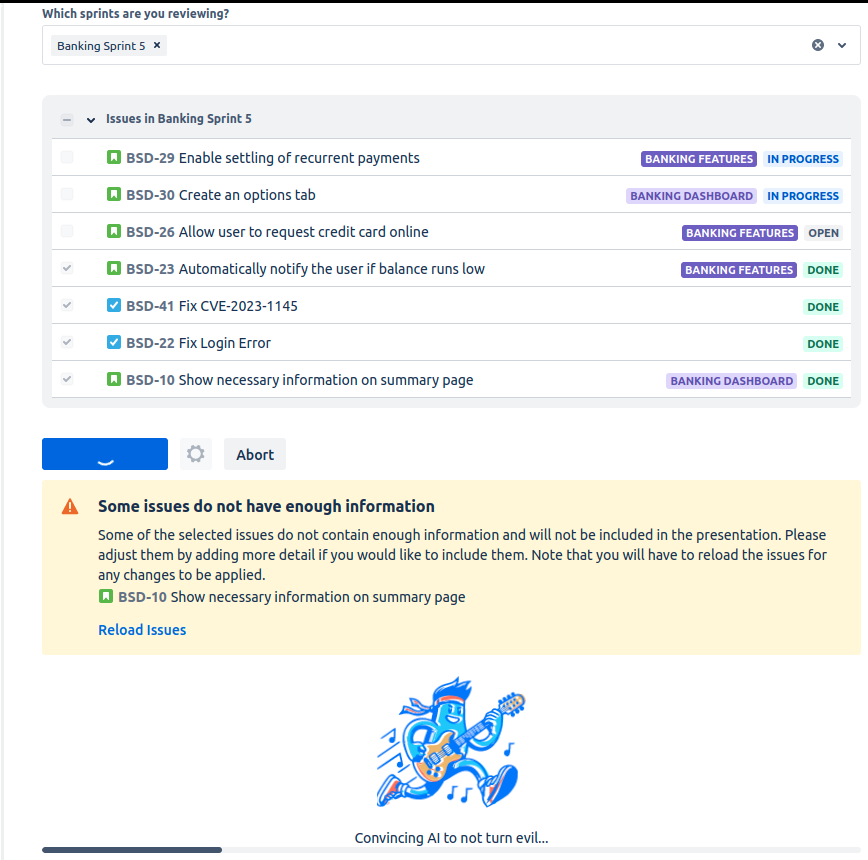
At this point, you can either let the process finish, or abort the generation and expand the issue summary or description with more information. Note that you will have to reload the issues from Jira for your changes to take effect.
Download Slides
Once the generation process is finished (this typically takes about a few minutes), you can download your slides in .pptx format by clicking the Download slides link, which will automatically start your download process.